
Purpose
Keep access understandable for every user while preventing shared credentials, cross-portal sessions and unverifiable password recovery.
Real WebStore screen
What you see
Controlled demonstration data · no customer records
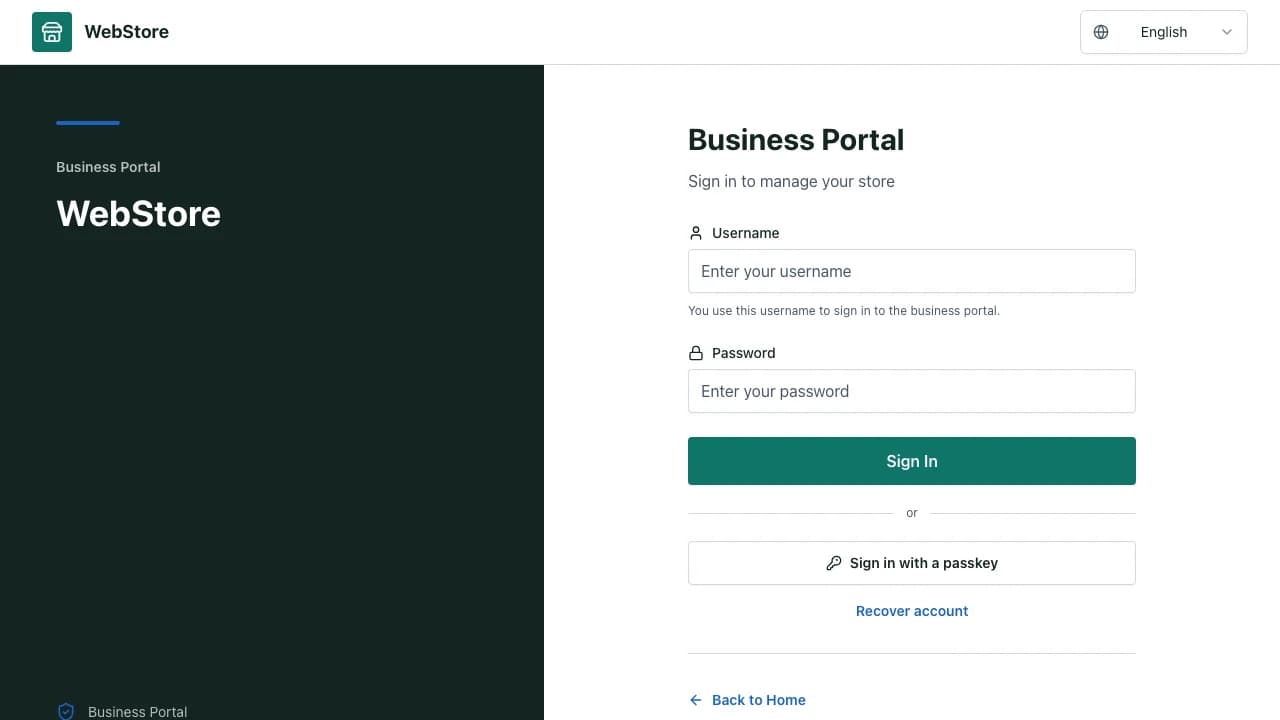
- 1Portal and account identity
- 2Secure sign-in or recovery action
- 3Help and safe return route
- Choose the sign-in page for the account type.
- Recover access through a delivered, expiring code.
- Understand why a role, module or tenant is unavailable.
Workflow
- 1
Open the sign-in route for the intended portal.
- 2
Enter the named account identifier and private password or approved factor.
- 3
Complete OTP, passkey or recovery verification when required.
- 4
Confirm the displayed identity, role and active context after sign-in.
- 5
Sign out or revoke sessions when a device or account is no longer trusted.
Use the correct portal route
Admin, business, consumer, partner and supplier identities have separate entry points and session boundaries.
- Do not retry one account type on another portal indefinitely.
- Use the return path to resume a protected deep link.
- Verify the displayed role after authentication.
Recover access with proof
A recovery code must be delivered through a verified contact method and expire after a short period.
- Request a new code from the recovery screen.
- Never accept a code supplied by an unknown person.
- After reset, revoke older sessions when that option is offered.
Resolve access boundaries
A successful login does not imply permission for every store or module.
- Confirm active account status and membership.
- Review the assigned role and enabled feature pack.
- Ask an authorized owner for access rather than sharing credentials.
Permissions and boundaries
- Every person uses a named account; shared admin or owner credentials are not supported.
- Recovery codes are short-lived, single-use and bound to the requesting account.
- Portal sessions and tenant memberships are validated independently.
When it goes wrong
If no recovery code arrives, verify the masked destination and request a fresh code after the cooldown.
If login succeeds but a route is forbidden, check role and tenant membership.
If a deep link loops to login, use its matching portal and preserve the return URL.