
Purpose
Use this chapter to choose the correct portal and understand how information moves from setup to customer action and daily operations.
Real WebStore screen
What you see
Controlled demonstration data · no customer records
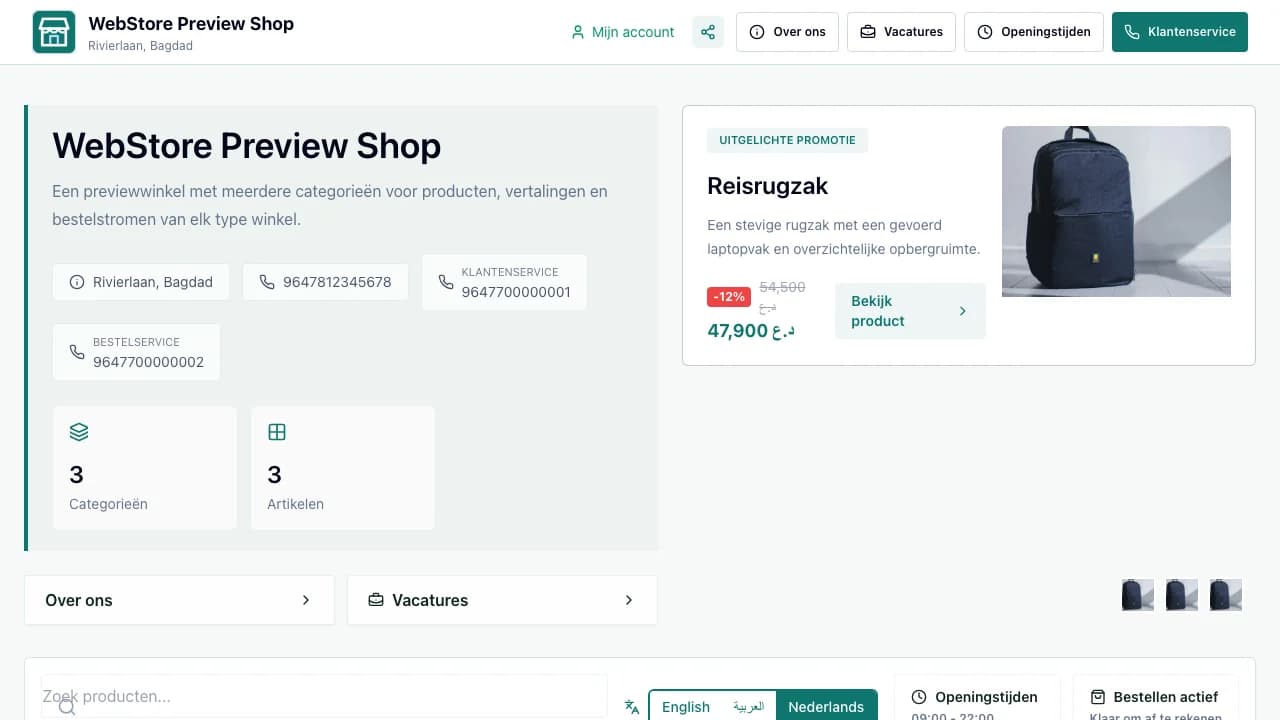
- 1Store identity and customer actions
- 2Category and product discovery
- 3Order entry point
- Choose the correct sign-in route for each role.
- Recognize which workspace owns a change.
- Follow a customer action into operations and reporting.
Workflow
- 1
A business configures products, services and operating rules.
- 2
The storefront publishes only information intended for customers.
- 3
Customers discover, order, book, apply or send a message.
- 4
Teams process the work in their role-based workspace.
- 5
Owners and admins review outcomes, access and platform health.
Choose the right environment
Every WebStore portal has a separate responsibility and data boundary.
- Public pages are for discovery and customer conversion.
- The business workspace controls one store or service organization.
- Admin, partner and supplier portals expose only their assigned scope.
Follow the complete handoff
A published change should be checked where the next person actually sees it.
- Preview customer-facing changes before publication.
- Confirm that operational queues receive the resulting task.
- Use analytics and audit history to verify the outcome.
Permissions and boundaries
- A signed-in user sees only portals, stores and actions assigned to that account.
- Customer-facing previews never grant workspace permissions.
- Sensitive finance, health and identity data remains inside its authorized workflow.
When it goes wrong
If a menu is missing, confirm the portal, active context, role and enabled modules.
If published information differs, check publication status, language and channel availability.
If access changed recently, sign in again before reporting a permissions issue.