

Purpose
Use public search, maps, store pages and clear product or service information to move from discovery to a confident next step.
Real WebStore screen
What you see
Controlled demonstration data · no customer records
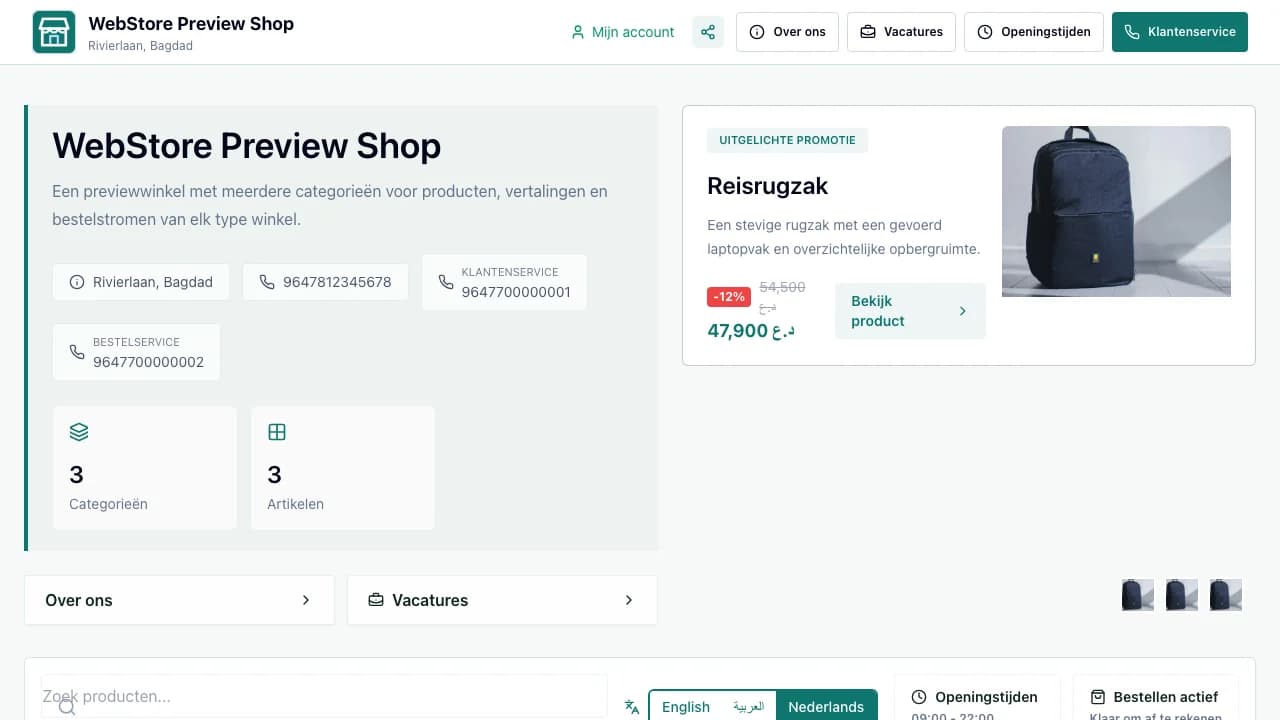
- 1Store identity and trust details
- 2Category navigation
- 3Products, pricing and promotions
- Find stores by type, place and customer need.
- Read price, availability, delivery and business details.
- Move into ordering, booking, messaging or applying without confusion.
Workflow
- 1
Search by product, service, business type or location.
- 2
Compare the relevant result details.
- 3
Open the store and select a category or service.
- 4
Review price, options, availability and fulfilment.
- 5
Continue with the customer action offered by that business.
Find the right result
Discovery surfaces use public store data and only show active, valid listings.
- Use autocomplete for a fast starting point.
- Apply location and business-type filters when the result set is broad.
- Move between list and map without losing the search intent.
Evaluate the offer
A useful store page answers what is sold, where, when and under which conditions.
- Check images, variants, promotions and stock state.
- Review opening hours, delivery area and contact methods.
- Use About, jobs and social links only when they add relevant context.
Take the next action
WebStore adapts the action to the business type and enabled modules.
- Retail products enter the cart.
- Services open appointment or quote flows.
- Vacancies and second-hand listings use their own focused journey.
Permissions and boundaries
- Only public and published information appears in discovery.
- Private customer, stock-control and workspace data is never exposed.
- Location visibility follows the store's public map settings.
When it goes wrong
If a store is missing, verify active status, valid location and public visibility.
If an item is unavailable, check its publication, stock and channel settings.
If filters return nothing, clear one filter at a time while keeping the search term.