

Purpose
Give platform administrators a controlled overview of stores and shared platform capabilities while preserving tenant boundaries.
Real WebStore screen
What you see
Controlled demonstration data · no customer records
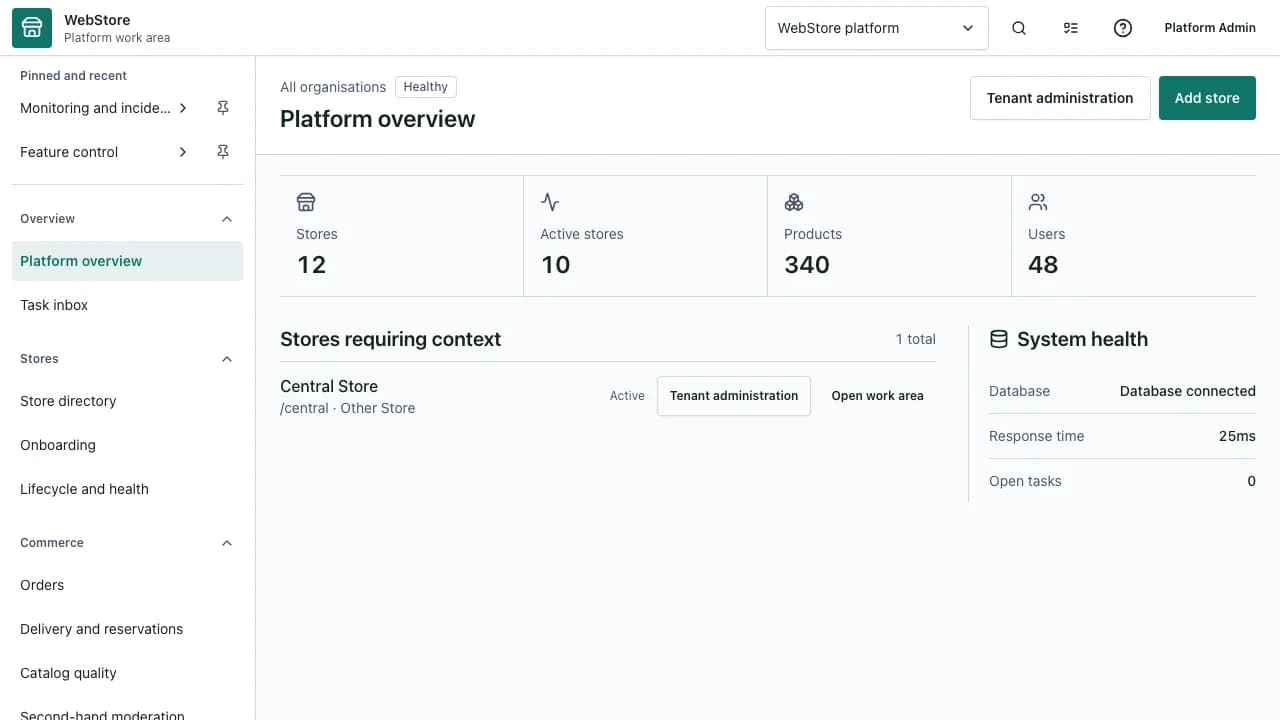
- 1Tenant search and filters
- 2Platform navigation and status
- 3Selected tenant control area
- Find and open the correct tenant without loading one long list.
- Separate platform administration from tenant operations.
- Review access, releases and health with auditable actions.
Workflow
- 1
Sign in with a named administrator account.
- 2
Search and filter the tenant directory before selecting a store.
- 3
Open the platform module or tenant workspace required for the task.
- 4
Make the least invasive change and record the reason where required.
- 5
Verify platform health, audit evidence and tenant outcome.
Work from the tenant directory
Server-side search and pagination prevent large tenant sets from becoming an unusable sidebar.
- Search by business name, city or identifier.
- Filter status, country and business type.
- Open the tenant workspace in a separate tab for comparison.
Use platform-level modules
Admin workspaces own cross-tenant concerns such as plans, partners, releases and shared feature policy.
- Keep tenant-specific catalog and order work in the business workspace.
- Use release assurance before publishing shared changes.
- Use guide management for reviewed documentation updates.
Support with boundaries
Support access should be explicit, time-bounded and visible in audit history.
- Confirm the tenant and support purpose before opening a workspace.
- Avoid impersonation when a read-only projection is sufficient.
- Close or revoke temporary access after verification.
Permissions and boundaries
- Admin roles determine tenant visibility and each platform capability.
- Admin access does not automatically grant every business workflow action.
- Sensitive changes require audit context and may require approval.
When it goes wrong
If a tenant is missing, clear filters and search its exact identifier.
If a workspace returns forbidden, review the admin role and tenant access policy.
If shared settings appear stale, confirm version and release status before editing again.